
Kodare
A Linux IDE built around Claude Code.
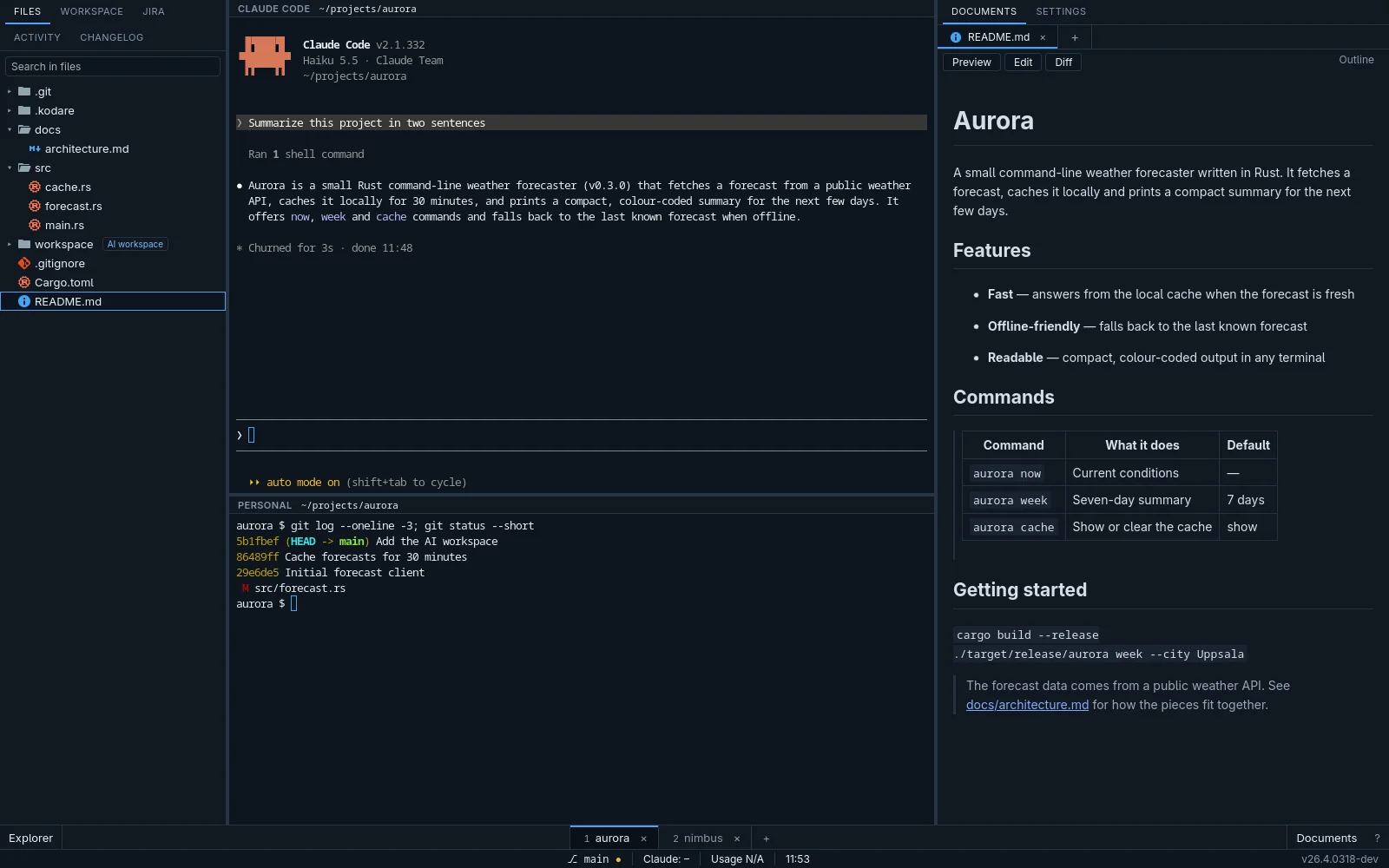
Claude Code runs in the main terminal. Your files, documents, Git, GitHub and Jira sit right beside it — and a per-project AI workspace keeps Claude's worklog and your decisions between sessions.
What Kodare does
Kodare is a free desktop IDE for Linux built around Claude Code, Anthropic's AI coding agent for the terminal. It does not ship an AI of its own: it runs your Claude Code CLI with your account, in a real terminal, and puts everything around it that you otherwise switch windows for.
-
Claude Code in the main terminal
Two real terminals per project: Claude Code above, your own shell below. Full-screen programs, colours and your normal environment all work; every key but a handful goes to the terminal.
-
Documents beside it
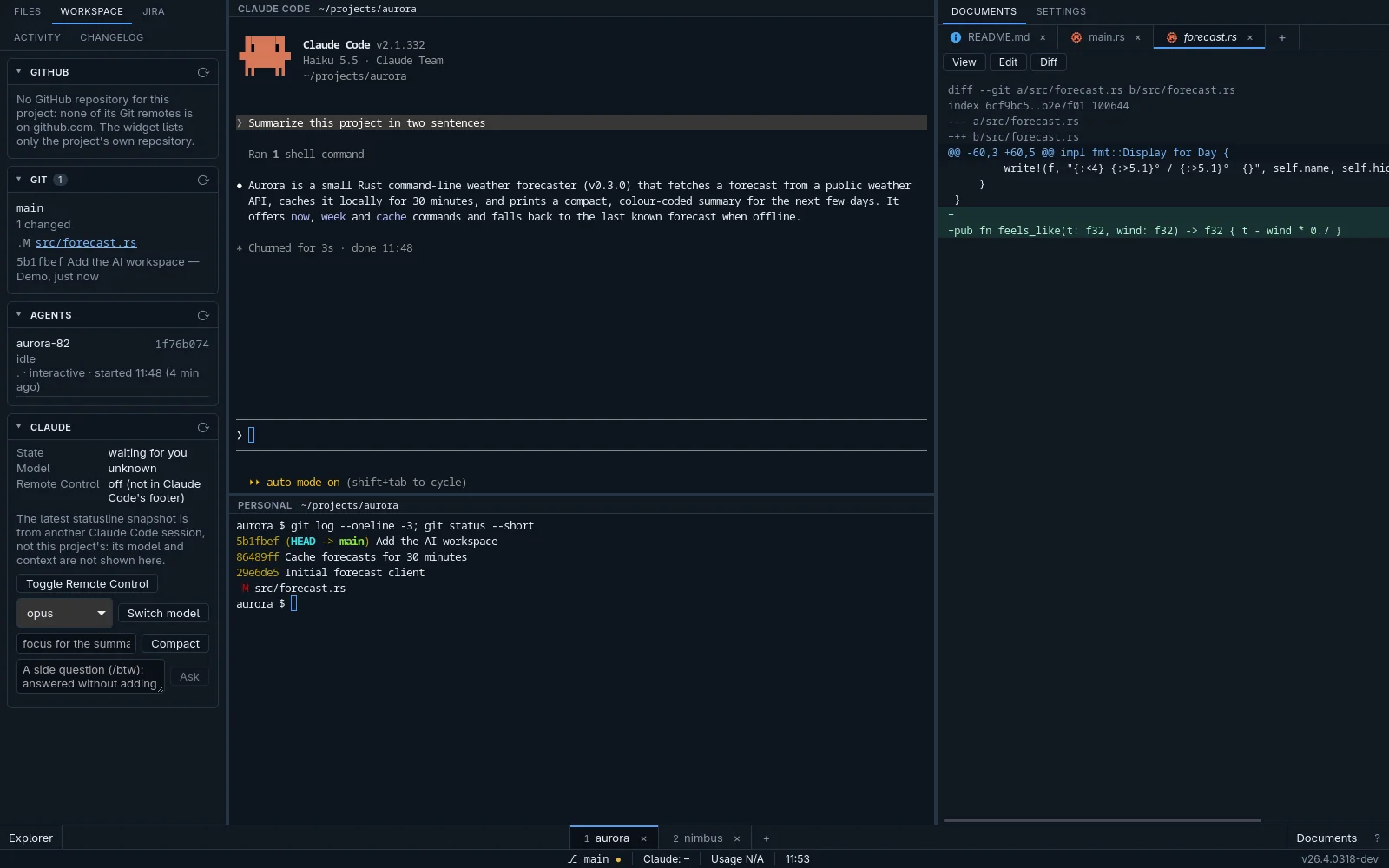
Markdown rendered or edited, code with syntax highlighting, HTML preview, images, PDFs and Git diffs — in tabs next to the terminal, so you read what Claude writes while it writes it.
-
Projects as tabs
Open several projects at once. Terminals in background tabs keep running, the tab shows when something happens, and your projects come back in the same order next time.
-
Git, GitHub and Jira widgets
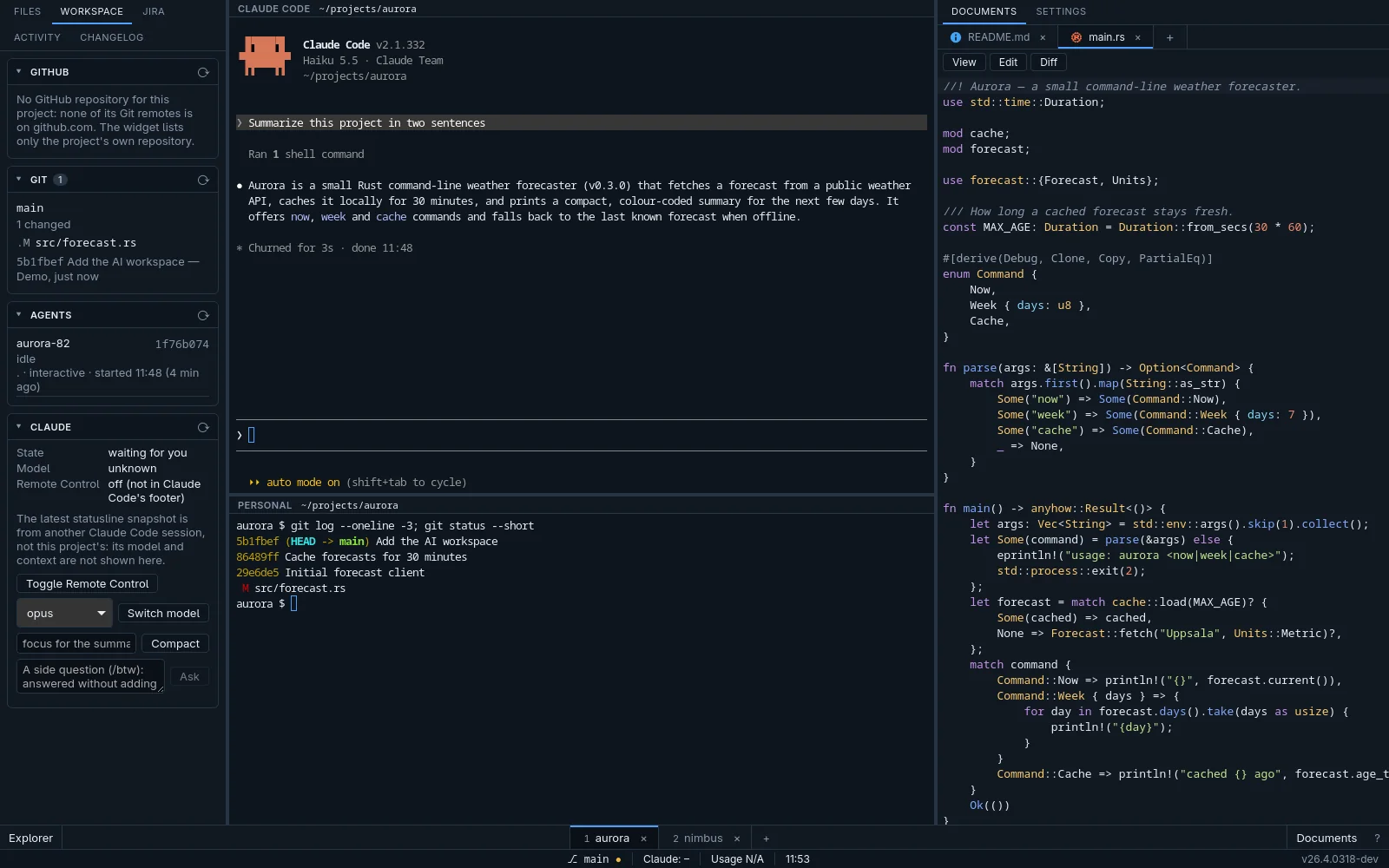
Branch, changes and the last commit at a glance; your pull requests and review requests through
gh; your Jira issues. Click a change to see its diff. -
Decisions and a worklog per project
When Claude needs you to decide, it asks in the Decision Inbox: options, previews and its recommendation, answered from the keyboard and kept as files in the project's AI workspace — next to the worklog Claude reads to carry on after a restart.
-
A safe close
Before Kodare closes, it lets Claude save its status to the worklog, and it asks before closing a terminal with a running job or a document with unsaved changes.
Screenshots
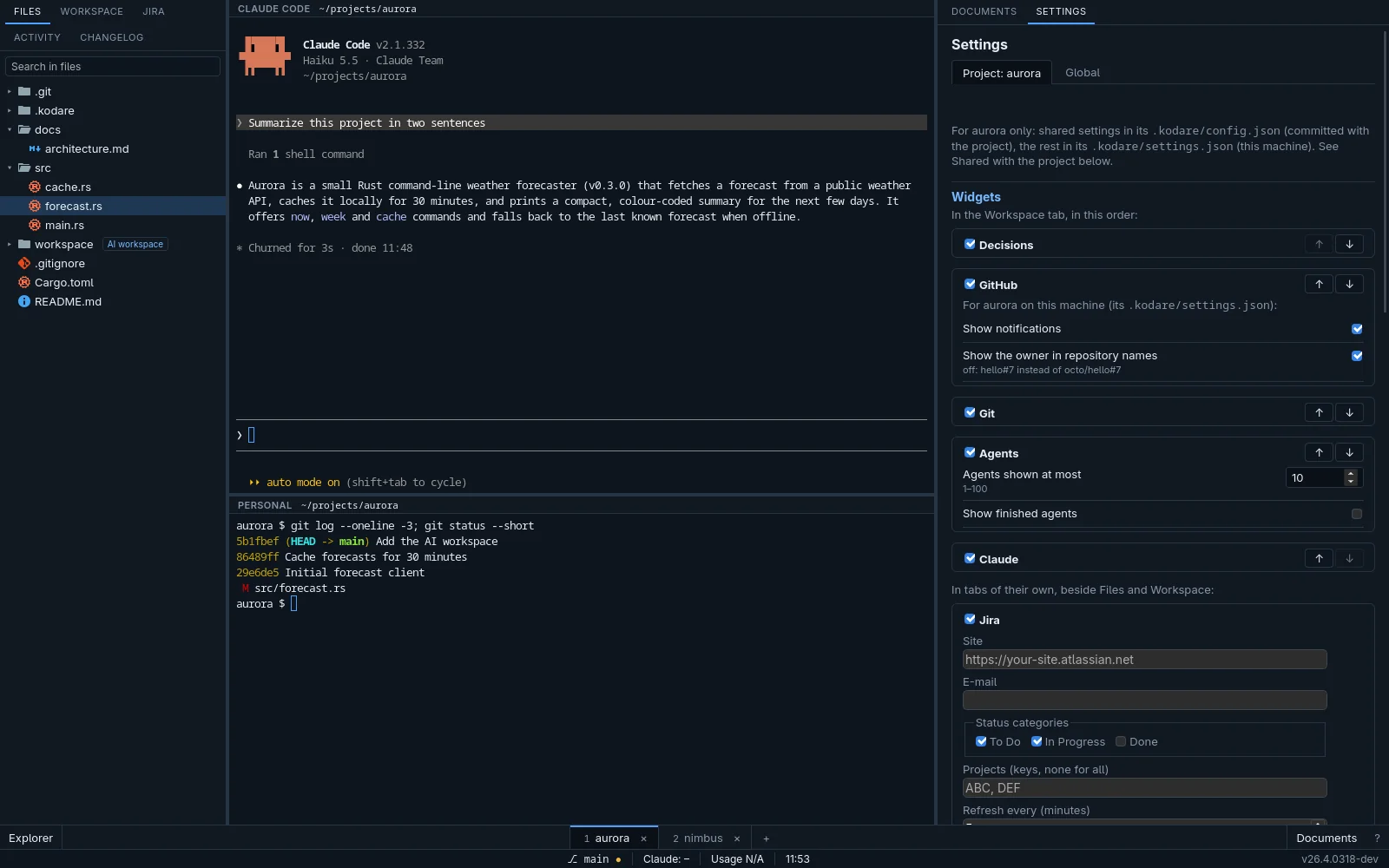
Real screenshots of Kodare with a small demo project. Select one to see it full size.
Download
Packages for 64-bit Intel/AMD (x86_64) and ARM (aarch64) computers. Pick your distribution; the install command is ready to copy.
Version 26.4.0373, released . All releases and checksums
Fedora
For Fedora, Fedora Asahi Remix, openSUSE, RHEL, AlmaLinux, Rocky Linux.
-
RPM · x86_64 (Intel/AMD) likely your computerDownload
kodare-x86_64.rpmsudo dnf install ./kodare-x86_64.rpm -
RPM · aarch64 (ARM) likely your computerDownload
kodare-aarch64.rpmsudo dnf install ./kodare-aarch64.rpm
On openSUSE, use sudo zypper install with the same file instead of sudo dnf install.
Fedora dnf repository
Install and get updates with dnf from Kodare's signed repository: add it once, then dnf install kodare.
Fedora 41 and newer (dnf5):
sudo dnf config-manager addrepo --from-repofile=https://kodare.app/rpm/kodare.repo
RHEL 9, AlmaLinux, Rocky Linux and older Fedora (dnf4, needs dnf-plugins-core):
sudo dnf config-manager --add-repo https://kodare.app/rpm/kodare.repo
Then:
sudo dnf install kodare
dnf asks once to import the signing key, Kodare packages <info@kodare.app>. Updates arrive with sudo dnf upgrade.
Ubuntu / Debian
For Ubuntu, Debian, Linux Mint, Pop!_OS, elementary OS.
Other Linux
For Arch, Manjaro, NixOS and any other distribution with WebKitGTK 4.1.
Build from source
Needs Node.js 22 or newer, Rust and the WebKitGTK development packages; the README lists them. The build writes the app and an RPM to src-tauri/target/release/bundle/.
git clone https://github.com/skoglind/kodare.git
cd kodare
npm install
npm run tauri build
Requirements
-
Claude Code
The Claude Code CLI, installed and logged in with your own account. Kodare can install it for you on first start.
-
Linux with WebKitGTK
A 64-bit Linux desktop (x86_64 or aarch64). The WebKitGTK runtime comes in with the package. Developed on Fedora KDE and Fedora Asahi Remix.
-
Git optional
For the Git widget, diffs and the changelog.
-
GitHub CLI optional
gh, logged in, for the GitHub widget.
Licence
Kodare is free to use and its source code is public, under the MIT licence with the Commons Clause. In plain words:
You may
- use Kodare for free — at home, at work, for any project
- read, change and build the source code
- share it, and share your changes, with this licence included
- build anything with it, commercial software included — what you write is yours
You may not
- sell Kodare, or charge for a copy of it
- sell a product or service — hosting, support or consulting included — whose value comes entirely or substantially from Kodare
Because of the Commons Clause, Kodare is source-available, not open source in the sense of the Open Source Initiative's definition. This summary is for convenience; the full licence text is what applies.
Questions and answers
Short answers to what people ask first.
What is Kodare?
Kodare is a desktop IDE for Linux built around Claude Code, Anthropic's AI coding agent for the terminal. Claude Code runs in a real terminal in the main part of the window; a second terminal for your own shell, the project's files, documents (code, Markdown, diffs, images, PDFs), Git, GitHub and Jira sit beside it, with one tab per project.
Is Kodare free?
Yes. Kodare is free to use, at home and at work, for any project, including commercial software you write with it. You may not sell Kodare itself, or a product or service whose value comes entirely or substantially from it. Claude Code needs your own Claude account with Anthropic.
Which Linux distributions does Kodare run on?
Kodare runs on 64-bit Linux desktops, x86_64 (Intel/AMD) and aarch64 (ARM). There are RPM packages for Fedora, Fedora Asahi Remix, RHEL, AlmaLinux, Rocky Linux and openSUSE; .deb packages for Ubuntu, Debian, Linux Mint, Pop!_OS and elementary OS; and an AppImage for Arch, Manjaro, NixOS and other distributions with WebKitGTK 4.1. Kodare is for Linux only: there are no macOS or Windows builds.
Does Kodare include an AI model?
No. Kodare has no AI model and no account of its own. It runs your own Claude Code CLI, logged in with your own account, in a real terminal. If Claude Code is missing, Kodare can install it for you on first start.
Is Kodare open source?
Kodare is source-available, not open source in the sense of the Open Source Initiative's definition. Its source code is public on GitHub under the MIT licence with the Commons Clause: you may use, read, change, build and share it, but you may not sell it.
How do I install Kodare?
Download the package for your distribution from the download section and install it with your package manager, for example sudo dnf install ./kodare-x86_64.rpm on Fedora or sudo apt install ./kodare-amd64.deb on Ubuntu and Debian; the AppImage runs without installing. Then make sure the Claude Code CLI is installed and logged in.
Is Kodare made by Anthropic?
No. Kodare is an independent project by Fredrik Skoglind and is not affiliated with Anthropic. Claude and Claude Code are trademarks of Anthropic.
Try Kodare
Free for Linux. Bug reports and ideas are welcome on GitHub — and if Kodare is useful to you, tell others about it.